 vgagaleski
 When Playwright introduced its new AI Agents, I couldn’t resist trying them out on on a real webpage.
In this blog, I’ll walk you through how the Planner, Generator, and Healer with the support of Cursor helped me automate my Astro blog from scratch — what worked impressively well, what still needed a nudge from experience (and a few prompts), and what this says about the future of AI-assisted test automation.
Setting Up Playwright’s AI Agents
Installation and Initialization
The setup process for Playwright’s agents is straightforward and well-documented in the latest Playwright release notes.
To get started, I first upgraded my existing Playwright installation to v1.56:
npm install -D @playwright/test@latestThen, from within VS Code, I initialized the new AI agents with a single command:
npx playwright init agents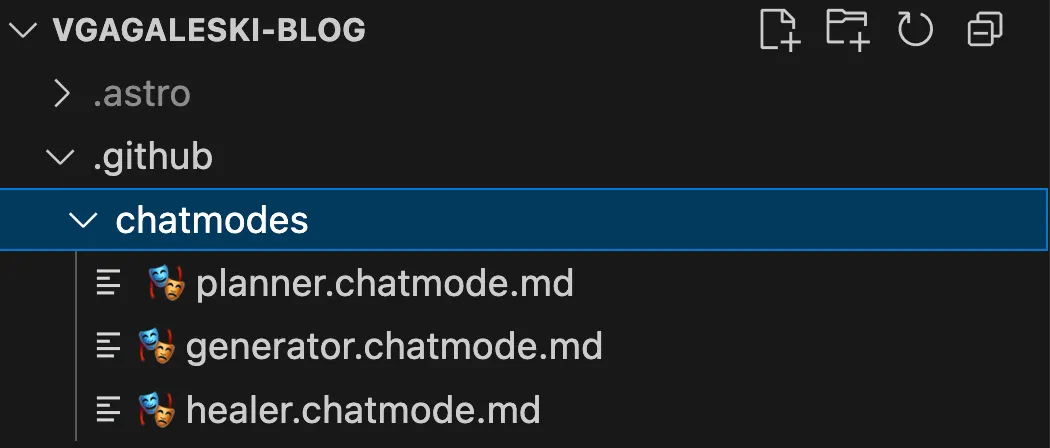
This scaffolded everything needed for AI-assisted testing. After initialization, the agents (Planner, Generator, and Healer) became available in the Playwright panel dropdown. The command also created a seed test file that can be used by the agents.
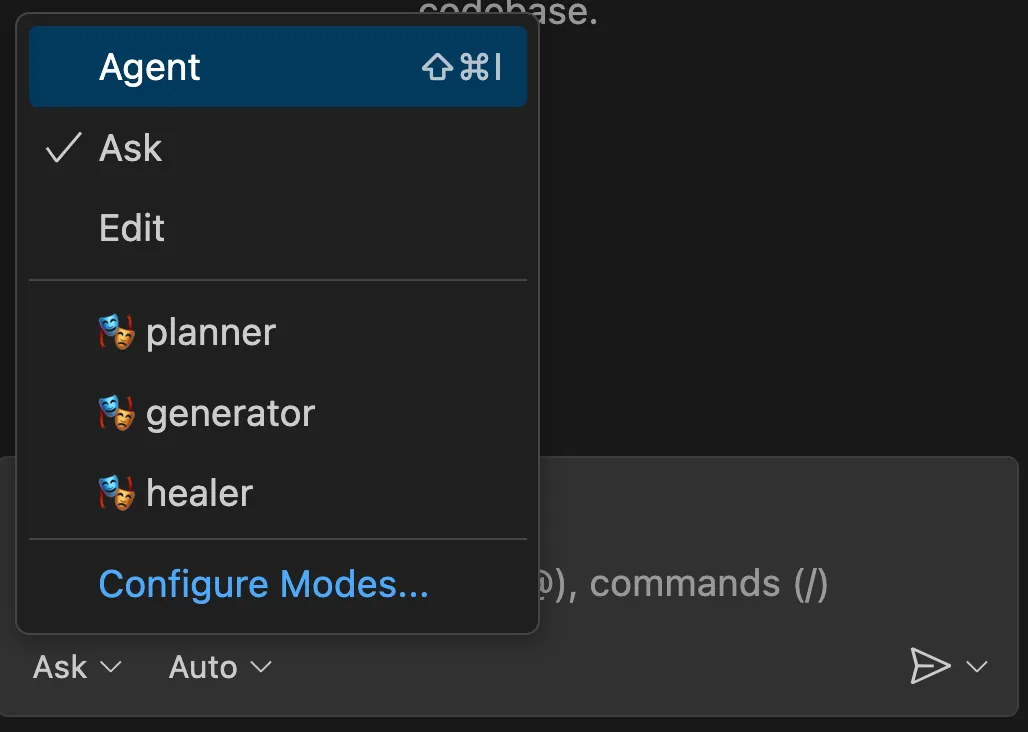
Understanding the Agents and MCP Servers
Once initialized, make sure you have Playwright MCP – the original base server, installed. I was using the one that is available here: https://github.com/microsoft/playwright-mcp.
By default, some tools aren’t automatically wired to the agents – you could see this if you open the chatmode.md files. To ensure everything functioned properly, I manually enabled tool access for the Planner, Generator, and Healer under the tools panel for copilot (there is a small icon in the right corner of the Copilot window), granting access to actions like Edit, Search, and Playwright MCP.
With that in place, I had a fully configured environment where the agents could independently explore my website, plan tests, generate code, and attempt to heal failing tests — all without any pre-existing context or manual input from me.
Using Playwright’s AI Agents
With the setup complete, I decided to see how well these agents could understand, plan, and automate my site purely on their own initiative.
🎭 Planner – explored the app and produced a markdown test plan
🎭 Generator – transformed the plan into Playwright Test files
🎭 Healer – executed the tests and automatically repaired failing ones
The experience was a mix of automation magic and hands-on guidance.
Planner: Strong scenario understanding
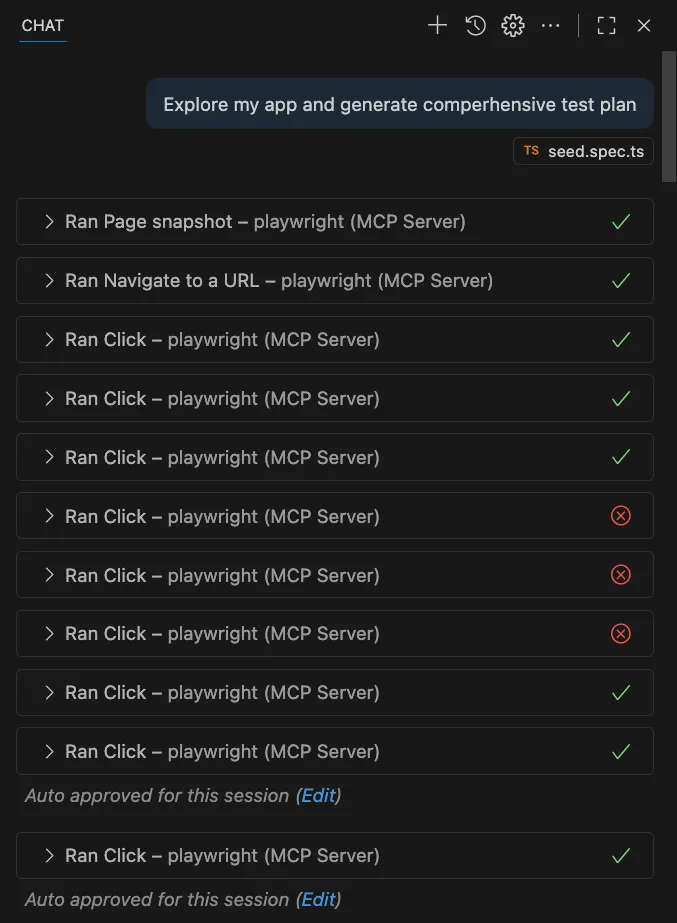
The Planner impressed me. It successfully explored the app, recognized the key pages, and produced a well-structured markdown test plan covering all major flows.
Its suggested journeys aligned surprisingly well with the user flows I had already identified manually — homepage navigation, reading posts, and tag filtering — confirming that this AI tool can effectively capture realistic user behavior. Of course, this is a relatively simple blog page without complex flows, so I expect the results to vary with more complex applications.
Generator: Needs guidance but shows promise
The Generator did a decent job turning the plan into Playwright tests, but not without challenges. Some generated scripts were incomplete or overly generic, requiring manual adjustments.
The highlights from the Playwright agent–generated code were that it prefers getByRole by default which is accessible, stable, and highly readable. This aligns with user-centric locator best practices and reduces flakiness. However, there were also cases where AI-generated locators were close, but not perfect.
For example, getByText('Viktor Gagaleski') matched multiple elements. I refined them to be context-aware and actionable:
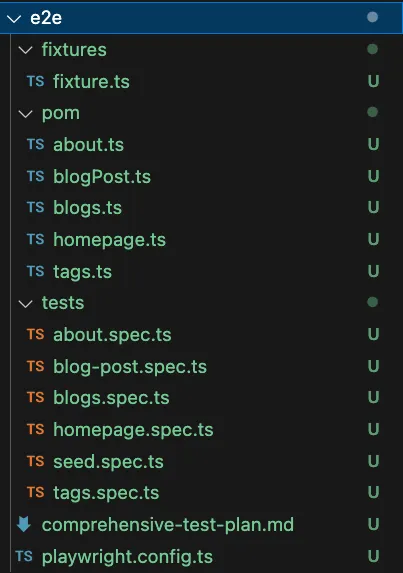
getByRole('link', { name: 'Viktor Gagaleski' })So far, I’ve been using Visual Studio Code, as the agents aren’t yet available in Cursor. Since I didn’t have any POM in place, I decided to use Cursor to create one for me — I find it does a better job than Copilot, and I already have a license for it. It was also my first time testing Cursor for this purpose.
Initially, Cursor generated Page Objects as classes. I prefer lightweight factory functions (const-based) for easier maintenance, so I asked it to refactor them and provided clear guidance on what I was expecting. I also asked it to add a simple fixture that could be used to share the pages across tests, which the agent hadn’t included initially.
Class-style POM (generated):
export class BlogsPage {
  constructor(private readonly page: Page) {}
  heading = this.page.getByRole('heading', { name: /blogs/i })
  list = this.page.getByRole('list')
}
Const factory (refined):
export const blogsPage = (page: Page) => ({
  heading: page.getByRole('heading', { name: /blogs/i }),
  list: page.locator('main').getByRole('list'),
  blogLinks: page.getByRole('link', { name: /playwright|slack/i })
})
The final step was to connect the Playwright Agent generated tests with the POM structure created using Cursor. I prompted the agent to do this, and to be honest, it did a surprisingly good job connecting the dots. It refined the output — started using the fixture and POM, improved assertions, added missing locators in the pages, and restructured parts of the code to follow best practices: simple, modular steps that leverage the POM before asserting outcomes.
Overall, while the Generator still needs guidance, it’s a promising tool for quickly producing readable and maintainable Playwright tests. I’m particularly curious to see how it would perform if a POM and supporting code were already in place — something I plan to explore in the future.
Keep in mind that I’m testing a very simple blog website. For a more complex application, I would expect the agent to create additional methods that combine multiple actions into cohesive user flows.
Healer: Debugging with a helping hand
Once the tests were in place, the Healer stepped in.
It executed the test suite, identified failing cases, and even suggested fixes — such as adjusting locators, retrying timeouts, or correcting minor assertions.
While it didn’t always resolve everything perfectly, it was a surprisingly effective debugging companion, especially for identifying root causes faster. At the same time, you can basically do the same using Cursor’s prompt and instead of lettin the MCP drive, you can send prompts and accept/reject the agent’s changes.
Conclusion
Building a production-ready Playwright test suite isn’t just technical — it’s strategic. Great tests don’t start with code — or even AI — they start with understanding your users.
- Design First, Code Second — Define user journeys before automation, you can use LLMs but these have to be vetted by human.
- Think Like a User — Focus on meaningful flows, not DOM trees.
- AI as a Partner — Let AI agents accelerate the process, but guide them with expertise, there will always be human in the loop.
- Iterate and Refine — AI can draft; humans must direct.
- Infrastructure Matters — Automate setup and environment handling.
- Be Pragmatic — Balance automation depth with maintenance effort.
Playwright’s AI agents — the Planner, Generator, and Healer — demonstrate what’s possible when automation intelligence meets engineering insight. They can design, generate, and even fix tests, but your judgment is essential to turn a working test into a reliable, maintainable test suite. With the right balance of human expertise and AI support, test automation becomes faster, smarter, and far more scalable.