Adding Voice Notes to Hermes Through Telegram
Typing on a phone is fine until the thought is longer than a sentence. Voice notes made Hermes useful in the moments where typing was the actual bottleneck.
In Part 1, I moved Hermes onto an always-on Hetzner VPS. In Part 2, I connected Hermes to Telegram so I could reach the same agent from my phone.
That solved access. It did not solve input.
Short Telegram messages were fine. Longer requests were not. Once a thought needed background, constraints, and a couple of steps, typing it on a phone became the slowest part of the workflow.
Voice notes were the obvious next step.
The setup I wanted was simple:
- Record a normal Telegram voice note
- Let the Hermes gateway download it
- Transcribe it locally on the VPS
- Inject the transcript into the conversation as a normal prompt
- Keep normal operational responses in text
- Use audio replies selectively when they are useful
Hermes supports that flow natively. My speech-to-text provider is local faster-whisper, so transcription does not require a separate speech API or an additional per-minute STT API fee.
There is one privacy distinction worth making up front: the voice note still travels through Telegram before it reaches the VPS. “Local STT” means the transcription step runs on my server. It does not make Telegram transport local, private to the VPS, or offline.
Why voice input changed the mobile workflow
Once an agent lives in Telegram, the shape of the requests changes.
On a desktop I have a keyboard, shell history, autocomplete, and copy-paste. On a phone, longer prompts are friction. That friction produces vague requests, and vague requests produce follow-up turns.
Voice notes are better when I need to provide intent and context:
- A project idea while walking
- A longer task brief
- Several constraints that belong together
- A follow-up I do not want to forget
- An asynchronous task I want waiting for me later
They are worse when precision matters:
- Exact paths
- Shell flags
- Code
- YAML indentation
- Names that speech models regularly mishear
The useful rule is not “replace typing with voice.” It is “use voice until precision matters, then switch back to text.”
Why I chose local faster-whisper
Hermes supports local and hosted speech-to-text providers. A hosted service can be convenient, but it adds another credential, another dependency, and another destination for the downloaded recording.
For this setup I chose the local provider backed by faster-whisper.
faster-whisper is a CTranslate2 implementation of Whisper. Its project describes it as up to four times faster than the original openai/whisper implementation at the same accuracy while using less memory. “Up to” matters: the actual result depends on the model, hardware, audio, and transcription settings.
My VPS has 2 vCPUs and 3.7 GiB of usable RAM. Hermes uses the base model, whose first download is roughly 150 MB. That is a practical starting point for a small CPU-only box: enough accuracy for normal speech without committing the memory and latency of the larger models.
The trade-off is accuracy. Technical names, paths, and noisy recordings are where the base model shows its limits. I address the recurring proper nouns with a vocabulary prompt rather than jumping directly to a larger model.
Installing local STT in Hermes’s environment
The safest route is to let Hermes install the dependency into the environment it actually uses:
hermes toolsUnder Speech-to-Text, select Local Whisper. Hermes installs faster-whisper into its managed Python environment.
On my source installation, that environment is:
~/.hermes/hermes-agent/venv/That detail matters. Activating an unrelated path such as ~/.venv can install the package into the wrong interpreter.
If I needed to install the package manually, I would still target Hermes’s managed interpreter explicitly:
uv pip install \
  --python ~/.hermes/hermes-agent/venv/bin/python \
  -U faster-whisper
The model downloads on first use, so the first voice note requires network access and pays a cold-start penalty. Hermes keeps the loaded model available by default, which avoids reloading it for every later recording.
Configuring the setup without hand-editing YAML
Hermes exposes configuration commands, so I used those instead of editing config.yaml by hand:
hermes config set stt.enabled true
hermes config set stt.provider local
hermes config set stt.local.model base
hermes config set stt.language en
The effective configuration is:
stt:
  enabled: true
  echo_transcripts: true
  provider: local
  language: en
  local:
    model: base
    language: ''
    vad: true
    vad_min_silence_ms: 500
    no_speech_prob_threshold: 0.6
    logprob_threshold: -1.0
    unload_after_idle_seconds: 0
I set the global language to English deliberately. Hermes defaults to en because Whisper can misdetect short or accented clips. If I regularly switched languages, I would clear the global value to restore automatic detection:
hermes config set stt.language ""An empty stt.local.language does not override a non-empty global stt.language. Hermes resolves the first non-empty provider-specific or global language hint.
Voice-activity detection and silence-hallucination filtering are enabled in my configuration. Silero VAD filters silence before it reaches Whisper, and Hermes drops segments only when both its no-speech probability and low-confidence thresholds are crossed.
Hermes also echoes the transcript back into Telegram by default. To transcribe for the agent without posting the extra transcript message, use:
hermes config set stt.echo_transcripts falseTeaching Whisper the names I use
The base model’s most useful improvement was not a larger model. It was a short vocabulary hint.
I configured the proper nouns that appear repeatedly in my work:
hermes config set stt.prompt \
  "Hermes, Nous Research, Teknium, SafetyNet, Household Manager, Content Forge, Hetzner, Tailscale, Telegram, faster-whisper, CTranslate2, Edge TTS"
I tested the change against the same generated audio file. Before the hint, the transcript began:
Hermie's voice setup is updated.After adding the hint, the same local provider returned:
Hermes' voice setup is updated.That is a small result, but it fixes the exact class of error I encounter most often.
One current-version wrinkle: Hermes v0.20.1 printed an “unrecognized config key” warning when I set stt.prompt, even though the official configuration documentation and the installed transcription runtime support it. The runtime test confirmed that the hint was consumed. That looks like validator lag, not an STT failure.
Restarting the gateway
Configuration and code changes take effect after restarting the gateway:
hermes gateway restartRun that from an external shell. A command launched by the gateway cannot restart its own parent process safely; Hermes blocks that path rather than killing the command halfway through.
From Telegram, the equivalent command is:
/restartI would not describe this as a systemd restart in every installation. Hermes can run under a service manager, inside a container, or as a manually managed process. On my host, hermes gateway status reports that the gateway is running manually rather than as an installed system service.
What happens to a Telegram voice note
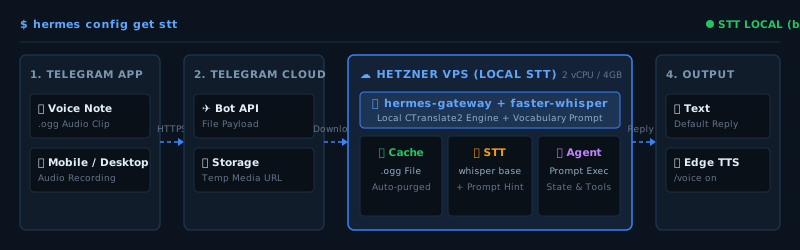
The voice-input path is:
- Telegram receives the recording.
- The Hermes gateway downloads it into a profile-aware local audio cache.
- The configured STT provider transcribes it.
- Hermes injects the transcript into the conversation as normal text.
- The agent processes the request and replies through Telegram.
Hermes also has an interactive voice mode in the CLI and TUI. That is a different workflow. The terminal version uses a microphone, stops after silence, can stream the reply sentence by sentence, and lets me interrupt while Hermes is speaking. My setup here is deliberately simpler: an asynchronous Telegram recording goes through the gateway, becomes a prompt, and leaves the response in the same chat.
Telegram voice notes normally arrive as .ogg files. Hermes’s installed source also performs media-cache housekeeping and removes old audio files after the configured retention period, which defaults to 24 hours. A separate backup could retain recordings only if that backup is configured to include the cache.
The privacy boundary is specific. Local STT avoids forwarding the downloaded recording to a separate transcription API. The original recording has still passed through Telegram, and Hermes temporarily stores a copy on the VPS.
The end-to-end test
My first useful test was intentionally boring:
Okay, this is a test message. Give me back a response that you received it.The gateway logs confirmed the path:
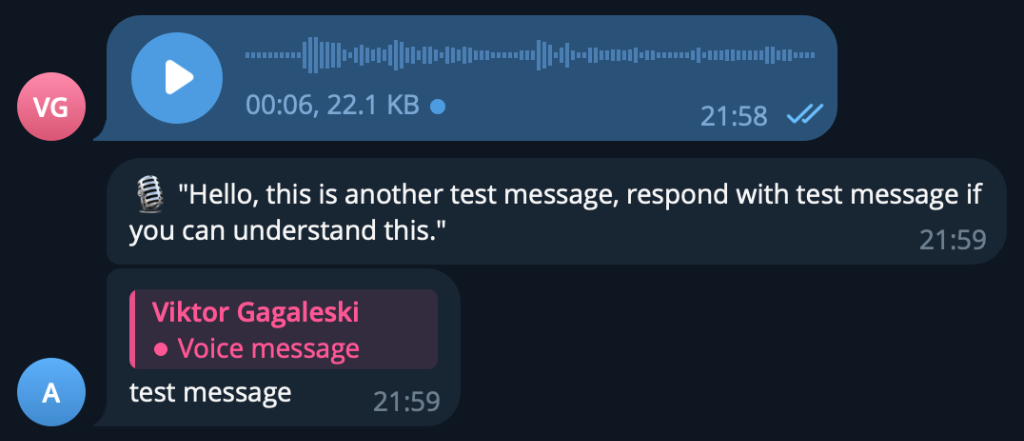
- Telegram cached an
.oggvoice note - Hermes loaded the base faster-whisper model
- Local Whisper detected English
- Hermes injected the transcript into the conversation
- The agent replied in Telegram
I did not run a controlled CPU benchmark, so I would not publish a precise utilization claim from a single recording. The honest conclusion is simpler: the base model works on this 2-vCPU VPS, the first request pays a model-load cost, and warm requests are fast enough for normal voice-note use.
I also ran a reproducible check after updating Hermes. Edge generated this sentence as an OGG voice message:
Hermes voice setup is updated. Local Whisper handles transcription, and Edge handles speech output.Local faster-whisper then transcribed the same artifact successfully. That verified both directions of the installed voice stack after the update.
Where the setup works well
Brain dumps
Voice is ideal when the request is mostly intent:
Make sure the next Hermes journey post explains why this setup became more useful once I could reach it away from the keyboard.Longer task briefs
I can explain the goal, constraints, and expected output in one recording instead of sending five short fragments.
Asynchronous task queueing
I can ask Hermes to inspect a project, run a check, or prepare a draft while I am away from the keyboard.
Where typing still wins
This is still a bad voice prompt:
Update slash home slash hermes slash projects slash content-forge...Paths, code, flags, and structured configuration belong in text. Voice is good at meaning. It is unreliable at punctuation-sensitive syntax.
Security and operational trade-offs
A voice note becomes an agent prompt. The Telegram security controls from the previous chapter still matter.
At minimum:
- Restrict the bot with
TELEGRAM_ALLOWED_USERS - Keep
TELEGRAM_BOT_TOKENin the active Hermes profile’s.env - Treat the audio cache as potentially sensitive data
- Check whether external backups include cache directories
- Use text for destructive or syntax-sensitive instructions so they can be inspected before sending
Local transcription does not make the full workflow offline. Telegram requires network access, and Hermes normally calls a hosted language-model provider after transcription. Edge TTS is also network-dependent.
The local STT stage still consumes VPS CPU, memory, disk, and bandwidth. It avoids an additional per-minute transcription API fee; it does not make the complete system cost-free.
Why text remains the normal output
My TTS provider is Edge, using en-US-AriaNeural:
hermes config set tts.provider edge
hermes config set tts.edge.voice en-US-AriaNeural
Edge requires no TTS API key and adds no paid TTS API fee, but it is a network service rather than a local or offline model.
STT and TTS are configured independently. Keeping local faster-whisper for transcription does not lock me to Edge for output. I could switch only the TTS provider to OpenAI, ElevenLabs, or another supported option. For now I keep Edge because it needs no separate TTS API key and selective audio replies are enough for my workflow.
Hermes produces the answer as text and then invokes text-to-speech when audio is requested. The language model itself does not generate the sound. For Telegram delivery, Hermes converts the result to Opus/OGG so Telegram can render it as a native voice bubble.
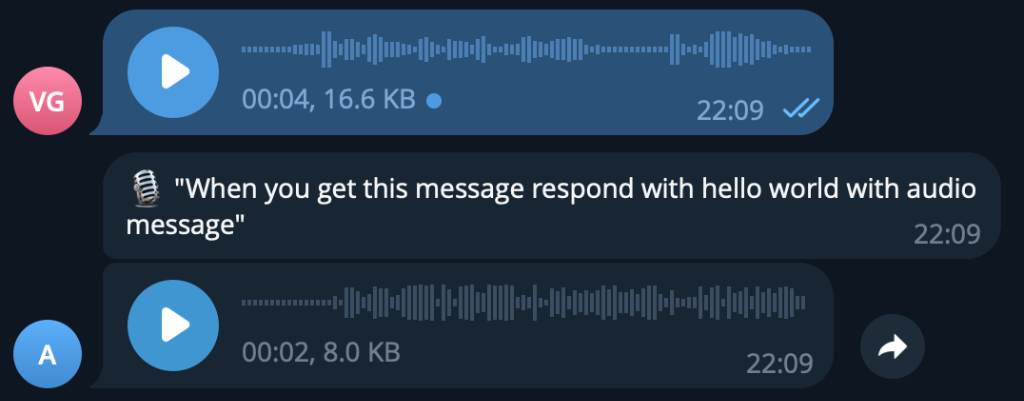
I still keep normal operational responses in text because text is better for:
- Scanning quickly
- Copying commands
- Checking exact wording
- Avoiding audio playback in public
- Keeping a searchable record in the chat
Audio remains useful for selected conversational replies. The normal pattern is voice in and text out, with Edge available when I want the loop to end in audio.
Telegram exposes the choice directly:
/voice on      # voice input receives a voice reply
/voice tts     # all messages receive voice replies
/voice off     # return to text replies
/voice status  # show the active mode
For my workflow, /voice on is the useful middle ground: spoken requests can receive spoken answers while typed technical work remains readable.
The real takeaway
Voice notes did not turn Hermes into a different agent. They removed a bottleneck from the interface I was already using.
That is the test I care about: not whether transcription is perfect in ideal conditions, but whether it is good enough that I use it when a useful thought shows up at the wrong time for typing.
For me, the answer was yes.
The Hermes Journey Series:
- Part 1: My Hermes Journey: Running a Self-Hosted Agent on Hetzner VPS
- Part 2: Controlling Hermes via Telegram: Remote Setup & Security
- Part 3: Adding Voice Notes to Hermes Through Telegram (You are here)
- Part 4: Hermes Agent Profiles: My Four Specialist AI Agents