Controlling Hermes via Telegram: Remote AI Agent Setup and Security
Connecting your self-hosted Hermes AI agent to Telegram converts a server-bound terminal tool into a mobile assistant backed by an always-on gateway, persistent sessions, memory, and skills. By running
hermes gateway setupand enforcing strict Telegram User ID allowlisting, you gain 24/7 access to your agent from your pocket without exposing terminal ports—Telegram added no separate gateway subscription; VPS and model-provider costs still apply.
SSH is unmatched when sitting at a desk with a keyboard and full display. But when you are away from your laptop, opening a mobile terminal app on a phone screen to check build logs or queue a background draft is slow and cumbersome.
In Part 1 of this series, I detailed setting up the Hermes agent runtime on a cheap Hetzner CX22 VPS (€5/month). The next evolution was making that always-on agent reachable from anywhere without tethering myself to a desk.
Originally configured in June 2026 and rechecked against Hermes v0.19.0 before publication.
This post covers how to wire Hermes to Telegram via its built-in gateway service, why an always-on gateway with persistent sessions, memory, and skills transforms mobile AI workflows, how to set up the configuration step by step, the underlying security model, and practical recommendations for daily use.
What this post covers: A practical blueprint for integrating the Hermes agent framework with Telegram messaging, evaluating the operational benefits, step-by-step setup commands using the official gateway wizard, essential security controls to prevent unauthorized access, and trade-offs when interacting with autonomous agents on mobile.
Why Connect a Self-Hosted Agent to Telegram?
Integrating a self-hosted agent with Telegram converts passive server automation into an interactive assistant reachable in seconds from any device.
Built-in Native Support for Messaging Apps
One of the standout design decisions in Hermes is its native, first-class support for messaging platforms. Rather than forcing you to write custom API wrappers, deploy separate bot servers, or rely on complex third-party automation tools (like Zapier or Make), Hermes ships with built-in messaging gateway modules right out of the box.
Through its hermes gateway architecture, the framework natively integrates with platforms like Telegram, Discord, and Slack. This means adding a chat interface to your remote agent isn’t a custom hack—it is a core feature of the agent runtime.
Bridging the Mobile-to-Server Gap
Commercial AI web and mobile apps (like ChatGPT or Claude) offer blazingly fast response streaming and sleek UIs. However, by default, commercial AI apps do not have direct access to your private VPS or local files, nor can they execute custom terminal tools.
Telegram integration with Hermes bridges this gap. While bot message transport over Telegram may feel slightly less polished than first-party streaming web UIs, it grants instant, mobile access directly to the persistent environment, tools, and session state ($HERMES_HOME/state.db) running on your Hetzner VPS.
(Note: Path locations in this guide reference $HERMES_HOME. By default, this resolves to ~/.hermes/, while named profiles use ~/.hermes/profiles/<profile>/.)
In my personal setup on a 2 vCPU / 4GB RAM Hetzner CX22 instance, three clear operational benefits emerged:
- Friction Reduction: Task queueing became significantly faster and smoother compared to launching a mobile SSH client (such as Termius or Blink) and authenticating keys on a mobile screen.
- Zero Extra Gateway Cost: Telegram added no separate gateway subscription; VPS and model-provider costs still apply.
- Low Transport Latency: Message transport and gateway dispatch happen almost instantly over Telegram’s HTTPS protocol before model processing begins.
Here is how Telegram compares with traditional interaction channels:
| Channel / Interface | Reachability & Speed | System & Memory Access | Setup Complexity | Best For |
|---|---|---|---|---|
| SSH Terminal (Hermes CLI) | High (Desktop); fast streaming CLI | Full VPS shell (when using local backend); shared Hermes profile & state | Medium | Deep refactoring, multi-file code editing, interactive debugging |
| Telegram Gateway (Hermes) | Instant (Mobile/Desktop app already open); low transport latency | Full VPS shell (when using local backend) & tools; shared profile & persistent memory | Low (interactive wizard) | Mobile task queueing, remote server status checks, background jobs |
| Commercial SaaS Apps (ChatGPT / Claude) | Fast streaming UI; separate app/tab | Cloud sandbox; vendor memory (no local server or file access) | None | General Q&A, brainstorming, complex reasoning without server side-effects |
What Makes the Hermes Telegram Gateway Great?
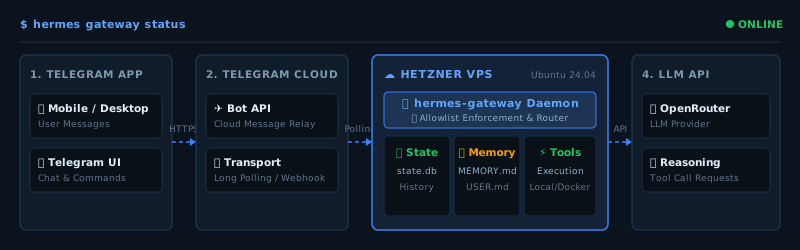
The primary advantage of the Hermes Gateway is context continuity: while Telegram DMs maintain their own distinct session key separate from an active CLI session (meaning they do not automatically share the exact same live conversation thread), both interfaces share the same underlying Hermes profile, long-term memory, files, tools, skills, and session history database ($HERMES_HOME/state.db).
When a Telegram session starts, Hermes loads its built-in memory by injecting $HERMES_HOME/memories/MEMORY.md and $HERMES_HOME/memories/USER.md as a frozen session snapshot (rather than rereading them before every message). The agent operates within the workspace directory configured for that profile (terminal.cwd) and executes configured platform tools, significantly reducing how often you need to re-explain project layouts and preferences.
If you ever need literal conversation continuity to transfer an active, live CLI session directly into your mobile chat, Hermes provides session resume mechanisms and an explicit handoff command: /handoff telegram.
High-Value Mobile Use Cases
- Asynchronous Task Queueing: Request long-running tasks while walking or commuting, then inspect results later at your desk.
- Instant Status Audits: Check whether background cron scripts, build jobs, or sync pipelines completed cleanly without opening a laptop.
- Low-Friction Brain Dumping: Feed raw notes, blog outlines, or code ideas into Hermes’ persistent memory before you forget them.
Real-World Example Prompts
/background Check the repository status and list any draft blog posts that are missing code examples.Summarize the last 50 lines of syslog on the server and report any errors from the last hour.How Do You Set Up the Hermes Telegram Gateway?
Setting up the Hermes Telegram Gateway can be completed quickly. While I originally configured my setup manually by editing environment files, Hermes now provides an official interactive setup wizard that is the recommended method for new deployments.
Step 1: Create a Bot via Telegram BotFather
- Open Telegram and search for the official
@BotFatheraccount. - Send
/newbotand follow the prompts to choose a bot name and unique username (e.g.,MyHermesVPSBot). - Copy the HTTP API Access Token provided by BotFather (format placeholder:
<YOUR_TELEGRAM_BOT_TOKEN>).
Step 2: Configure Gateway Credentials
Recommended Method: Hermes Gateway Setup Wizard
Log into your VPS as the hermes user and launch the interactive setup tool:
# Launch the interactive gateway setup wizard
hermes gateway setup
The wizard will prompt you to select Telegram, enter your Bot Token (<YOUR_TELEGRAM_BOT_TOKEN>), and specify your numeric Telegram User ID (<YOUR_TELEGRAM_USER_ID>) for authentication.
Pro-Tip: To find your stable numeric Telegram User ID, send any message to
@userinfobotinside Telegram.
Original Journey: Manual Configuration
When I first set up Hermes, I manually created and populated the environment configuration file directly at $HERMES_HOME/.env (defaulting to ~/.hermes/.env, or ~/.hermes/profiles/<profile>/.env for named profiles):
# $HERMES_HOME/.env
TELEGRAM_BOT_TOKEN=<YOUR_TELEGRAM_BOT_TOKEN>
TELEGRAM_ALLOWED_USERS=<YOUR_TELEGRAM_USER_ID>
Set restrictive permissions on the secrets file:
chmod 600 ~/.hermes/.envIf you are using a named profile, restrict its environment file separately (e.g., chmod 600 ~/.hermes/profiles/<profile>/.env).
Step 3: Install and Manage the Background Service
Hermes includes CLI management for its background daemon service (hermes-gateway systemd user unit).
(Note: During my initial installation, attempting hermes gateway install --user returned an error; executing hermes gateway install directly was the correct command to register the user service.)
# Install the systemd user service unit for hermes-gateway
hermes gateway install

# Enable linger so user daemons remain active after SSH logout
sudo loginctl enable-linger hermes

# Start the gateway daemon
hermes gateway start
Step 4: Verify Gateway Operation
To verify that your gateway daemon is running properly and inspect its logs, run:
# Check daemon service status
hermes gateway status

# Follow live gateway runtime logs
hermes logs gateway -f
Long polling is the default operational transport mode for the Telegram gateway unless webhook mode is explicitly configured. Send /start or a normal message to the bot. Hermes checks the sender’s numeric User ID against the configured allowlist before dispatching the message to the agent.
What Are the Security Risks & Who Can Access Your Agent?
Because a Telegram-connected agent can execute terminal tools on your server, understanding its identity model and sandbox boundaries is critical.
Default Fail-Closed Security Model
By default, Hermes enforces a fail-closed security architecture: incoming users must be explicitly allowlisted or approved through DM pairing before their messages can reach the agent. Otherwise, access is denied before model invocation or tool execution.
The primary security risks arise from dangerous configuration choices and secret management mistakes, such as:
- Setting
GATEWAY_ALLOW_ALL_USERS=true. - Accidental inclusion of extra user IDs in the allowlist.
- Approving unknown pairing requests.
- Leaking the bot token (
TELEGRAM_BOT_TOKEN) in public repositories or shell logs. - Compromise of an allowlisted user’s personal Telegram account.
Privacy Note: Telegram bot communication is mediated through Telegram’s cloud infrastructure. While transport to Telegram servers uses HTTPS, bot messaging is not end-to-end encrypted.
System Permissions vs. Container Isolation
Running Hermes under a dedicated non-root Linux account (hermes) limits system-wide administrative risk. However, standard Linux permissions mean the hermes user can still read files owned by its own home folder—including SSH keys and $HERMES_HOME/ secrets.
Setting terminal.cwd simply establishes a starting directory for shell commands; it does not provide filesystem isolation.
Note: My actual setup uses the default local terminal backend (terminal.backend: local). Docker isolation was not part of my initial Telegram installation.
For users looking to add process-level containerization, Hermes offers an optional Docker backend configuration in $HERMES_HOME/config.yaml. Using a documented development image like "nikolaik/python-nodejs:python3.11-nodejs20" ensures necessary runtime tools are available in the container:
# $HERMES_HOME/config.yaml - Optional Docker Backend Sandbox
terminal:
  backend: docker
  docker_image: 'nikolaik/python-nodejs:python3.11-nodejs20'
  docker_forward_env: []
While running shell commands inside a container provides isolated execution environment boundaries, it does not automatically guarantee full host-secret protection (for instance, if host directories or sensitive environment variables are explicitly mounted). Strict environment hygiene remains essential.
What Are the Limitations & Recommendations for Telegram Control?
While Telegram provides unmatched mobile convenience, understanding its interface constraints ensures a smooth operating experience.
Key Operational Constraints
- Message Splitting: Telegram enforces a 4,096-character limit per message. Hermes automatically splits long outputs across multiple messages, but dense code diffs can still look visually cluttered on small screens.
- Virtual Keyboard Editing: Refactoring complex multiline code blocks on a mobile touch screen is slow and error-prone.
- Ambiguous Mobile Prompts: Short mobile prompts like “Clean up the project” carry higher ambiguity. Specify exact file targets when messaging on the go.
Recommended Operating Conventions
- DO use Telegram for: Status checks, quick content outlines, asynchronous task queueing, log summaries, and triggering pre-written scripts.
- DO NOT use Telegram for: Large multi-file refactoring or unreviewed system administration.
- Output Logging: Ask Hermes to write heavy command outputs to local files inside your project workspace (such as an
artifacts/orlogs/directory) and return a brief summary in chat.
The Hermes Journey Series:
- Part 1: My Hermes Journey: Running a Self-Hosted Agent on Hetzner VPS
- Part 2: Controlling Hermes via Telegram: Remote Setup & Security (You are here)
- Part 3: Adding Voice Notes to Hermes Through Telegram
- Part 4: Hermes Agent Profiles: My Four Specialist AI Agents