My Hermes Journey: Running a Self-Hosted Agent on Hetzner VPS
A stateless chatbot helps when you ask. An always-on agent keeps working when you close the laptop. This is the story of how I went from local terminal tools to running Hermes on a cheap Hetzner VPS as my first “real” self-hosted AI agent.
Most developers still run their AI workflow in the browser: open tab, paste code, explain the project setup, get an answer, close tab, lose context, repeat. Even if they have some local scripts, everything depends on that one laptop being awake, online, and happy.
My day-to-day doesn’t really look like that. I live in the terminal with tools like Claude Code and Antigravity (agy), and that already keeps things fast and close to the metal. But even with good local tooling, there’s a hard limit: all execution is anchored to one physical machine.
I wanted to cross that line. I wanted an AI-native setup where the agent lives on its own box, has a persistent memory, and can keep doing work even when I’m out walking or on the go. That meant moving the “brain” off my laptop and onto a VPS: an always-on agent, running as a background service, reachable from chat or SSH, with a context that doesn’t reset every time I close a window.
This post is the first chapter of that journey—why I went self-hosted, how I got Hermes running on a cheap Hetzner VPS without Docker, the silly mistakes along the way, and the basics of hardening the machine so it doesn’t feel reckless.
What this post is not: This is not a production security playbook, and it’s not a recommendation to give an agent free rein over critical infrastructure. This is my personal starter setup for experimentation—step one in moving from local, session-based AI tooling to an always-on, server-based agent with a limited blast radius and basic hardening.
What is Hermes?
Hermes Agent is an open-source autonomous agent framework from Nous Research.
The key idea: instead of a “chat window” that forgets everything when you refresh, Hermes runs as a long-lived, stateful process. It’s model-agnostic, so it can talk to Anthropic, OpenAI, OpenRouter, etc., while keeping its core logic and memory on your server.
A few things turn it from a cool demo into a useful dev tool:
- Learning loop: When Hermes solves something non-trivial, it doesn’t just answer and move on. It reflects on the steps, writes down “skills” as markdown, and reuses them later. Over time, recurring tasks get faster and more reliable.
- Persistent SQLite memory: It tracks preferences, directory layouts, and past interactions in a local database, so you’re not explaining your repo structure from scratch every Monday morning.
- Gateway: It has a built-in server module that lets you talk to the agent via Telegram, Discord, Slack, etc., instead of only via SSH.
In short: Hermes runs on your server, can see your filesystem, execute terminal commands, and talk to you via the tools you already use. That’s powerful—and also where the risk comes in. Once you give an agent shell access, things like user permissions, network access, and secret handling become part of the architecture, not “nice-to-have” follow-ups.
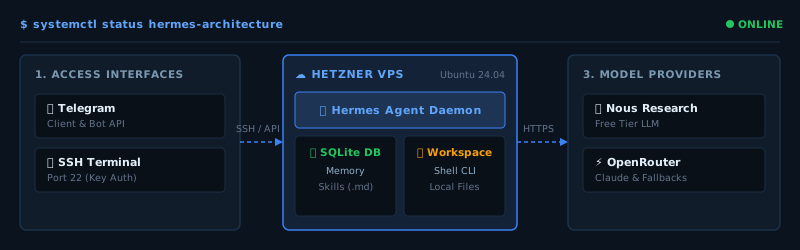
Why I Wanted My Own Hermes Agent
The decision to self-host came down to four very specific reasons, all aligned with a terminal-first workflow.
- Context loss is expensive. In normal chat UIs, half the session is onboarding: “Here’s the repo, here’s the layout, here’s the naming convention…” Over and over. A server-side agent can actually read the directories, so I can talk about code the way I already work in the CLI instead of copy-pasting snippets into a textbox.
- The “open laptop” dependency. If I want an agent to run a long Playwright or integration suite, or do a big audit, the local setup forces me to babysit the machine: don’t close the lid, don’t lose Wi‑Fi. On a VPS, that work just keeps going. The agent lives on a box that’s supposed to be running 24/7.
- Access from anywhere. I wanted to check task status, queue blog outlines, or trigger simple workflows from my phone via Telegram, without juggling multiple “copies” of the agent. The VPS becomes the single source of truth: same state, reachable through SSH or chat.
- Controlled experimentation. Self-hosting is a playground. I can experiment with model routing, tools, logging, permission boundaries, and automation patterns without being locked in to one closed UI. Everything from the filesystem to the process model is under my control.
Why Not Just Use Claude Code, Cursor, etc.?
I still use Claude Code, Cursor, ChatGPT and friends. Hermes is not a replacement for those tools.
For focused coding sessions—refactoring a TypeScript module, debugging a flaky Playwright test, reviewing a diff, or working inside an IDE—those tools are usually the best option. They’re optimized exactly for that.
Hermes is solving a different layer: it’s about the runtime, not the editor.
The crucial difference is that Hermes separates the agent runtime from the model provider. The memory, skills, filesystem, gateway, and workflows live on my box. The model is “just” an API behind it.
That matters because model access is fragile. Models can disappear or change overnight due to pricing, regional rules, safety policies, or random product decisions. The recent Fable 5 / Mythos 5 turbulence was a great reminder that building your entire workflow on one model is a risk.
With Hermes, I’m not betting everything on a single LLM. I can route through different providers, use OpenRouter, plug into Anthropic or OpenAI, or eventually go local with something like Ollama or vLLM. The agent stays the stable layer; the model becomes replaceable infrastructure.
That’s why Hermes is interesting to me: it’s not “my best coding assistant”, it’s my experiment in building a persistent, model-agnostic, always-on agent runtime that I actually own.
Why Self-Host Hermes? Picking a Platform
Picking where to run Hermes is basically a trade-off between monthly cost and how much you want to babysit the machine.
SaaS vs. Self-Hosting
Managed agent platforms are comfortable: click, sign up, and you’re done. But you trade away control. They decide how your data is stored, what tools the agent can call, and how much each run costs. Self-hosting means the logs, memory, files, and execution state live on your server. The models are still external, but the runtime is yours.
Cloud Options: AWS vs. Hostinger vs. Hetzner
Here’s how I looked at it:
- AWS / GCP / Azure: Great for big infra, but overkill for “one agent on one small VPS”. By the time you add the usual cloud extras (VPC, storage, egress), your 4GB instance is quickly in the €20+/month range.
- Hostinger / similar: Nice pre-configured templates (Docker, control panels, some AI stacks). Good if you want plug-and-play. The downside is extra abstraction: when a command fails, you’re debugging both their container stack and your Python environment.
- Hetzner VPS (bare Ubuntu): This is where I landed. Simple pricing, solid performance, and a clean Ubuntu image with root access and no vendor magic. At the time I set this up, a CX22-style instance (2 vCPU / 4GB RAM) was in the low single-digit euros per month.
Here’s a quick overview:
| Provider / Option | Target Specs | Est. Cost / Month | Pros | Cons |
|---|---|---|---|---|
| Hetzner (CX22) | 2 vCPUs, 4GB RAM, 40GB SSD | ~€5 | Predictable, raw Linux, good performance | You own the hardening work |
| Hostinger (VPS 2) | 2 vCPUs, 4GB RAM, 80GB NVMe | ~€8–10 | Nice templates, more storage | Extra middleware to debug |
| AWS Lightsail | 2 vCPUs, 4GB RAM, 80GB SSD | ~€15–20+ | Enterprise ecosystem, static IP | Bandwidth costs, more complex console |
| Managed SaaS | Closed platform | €20–€100+ | Zero server admin | Vendor lock-in, less data control |
Install, Pain Points, and Basic Hardening
I went with a Hetzner CX22 running Ubuntu 24.04.
Pro-Tip: You don’t need to do all of this totally solo. Claude is surprisingly good at acting as your “pair sysadmin”. If you give it the docs, describe the environment, and ask it to help you with commands, it can generate and validate the steps so you don’t spend hours fighting tiny config mistakes.
Base Server Setup
High-level, the first steps were:
- Machine prep: SSH in as root, run system updates, and install basics: Python 3, python3-venv, git, curl, ufw, fail2ban.
- Non-root user: Running an autonomous agent as root is… not smart. I kept administration on a separate sudo account, created an unprivileged
hermesuser without sudo membership, and added my SSH public key without replacing any existing authorized keys. - Lock down SSH carefully: Before disabling root or password access, detect the effective SSH port, validate the SSH configuration with
sshd -t, allow that port throughufw, and prove the new key works in a second terminal session. Keep the original session open until the non-root account and its sudo access are verified. Only then disable the old login path and reload SSH.
Real-World Gotchas
A few things bit me early:
-
1. The OOM killer: On 4GB RAM, Hermes doing a heavy directory scan while other installs were running triggered the kernel’s OOM killer. No obvious error, just a silently dead process. Fix: I added a 2GB swap file and enabled it on boot:
# Create and enable 2GB swap file to prevent OOM kills sudo fallocate -l 2G /swapfile sudo chmod 600 /swapfile sudo mkswap /swapfile sudo swapon /swapfile echo '/swapfile none swap sw 0 0' | sudo tee -a /etc/fstab -
2. Service management changed: My first setup used a hand-written
hermes.service, but current Hermes versions manage the messaging process throughhermes gateway install. The generatedhermes-gatewayuser service is the supported path; on a headless VPS, systemd lingering lets that user service start at boot and survive SSH logout. Do not keep the legacy and generated services active together. Part 2 uses the current gateway workflow. -
3. SSH key drift: Using multiple devices is great until you realize only one of them is authorized correctly. I wasted time debugging “broken SSH” that was just a missing key. Fix: Keep
~/.ssh/authorized_keysin sync and make sure your local SSH configs match the server. -
4. Config drift: Editing configs on a live server late at night is a good way to forget what you changed. Fix: Document your config and ideally track it in a private repo, so you can see what you deployed last time.
Wiring Up Hermes
Once the server was reasonably locked down, the fun part started: installing Hermes.
Installing the Agent
My setup looked roughly like this:
- Dependencies & install: The project moves fast, so verify the current first-party installation guide before running anything. The official Linux installer remains the supported path. For a security-sensitive VPS, download the script to a temporary file, confirm that it came from the official Hermes domain, inspect it, and then execute it as the non-root
hermesuser instead of piping a network response directly into a shell. - Configuration: Let the current Hermes setup wizard create
~/.hermes/config.yamlrather than copying an old schema.hermes setup --portalis the simplest current route and uses Nous Portal OAuth;hermes modelis the interactive path for selecting another provider or entering a provider credential locally. - Secrets: Keep credentials out of chat, command arguments, shell history, source control, and agent logs. Enter them only in Hermes’s interactive terminal wizard or another approved local secret store. Hermes keeps user-managed secrets under
~/.hermes/.env; restrict that file to its owner and never print it during verification.
Configuring the LLM Safely
An agent framework is only as useful as the model behind it, but the provider setup should not depend on stale hand-written YAML or credentials copied through an LLM conversation.
My first iteration used a Nous free-tier model and a manually configured key. Hermes has since moved on: the current first-party quickstart recommends Nous Portal OAuth for the shortest path, while hermes model handles other providers interactively.
# Run locally in the hermes user's terminal; complete OAuth in the browser.
hermes setup --portal

# Or select another provider and enter its credential interactively.
hermes model
Whichever route you choose, get one normal CLI conversation working before adding a gateway, cron jobs, skills, or routing. That keeps troubleshooting narrow and prevents an authentication problem from being mistaken for a service or messaging problem.
I’ll publish a separate deep dive on LLM choices, routing, performance, and cost optimization for self-hosted agents.
The “Oh Wow” Moment
With the LLM configured and Hermes running, it was time to see if the agent really “saw” the machine. I sent a very simple prompt:
Tell me what files exist in /home/hermes and check the CPU architecture.Hermes went to work:
- Listed files under
/home/hermesusing its directory traversal tool. - Ran
uname -mvia its shell tool and told me it was onx86_64.
None of that is complex. But it felt different. The moment it clicked for me was when I asked Hermes from the server to inspect /home/hermes, check the CPU architecture, and explain what it saw. It was not impressive because the command was complex. It was impressive because the agent was finally sitting where the work happens.
Unlike web interfaces, there was no file uploading, no copy‑paste, and no manual context sync. Just an agent with terminal and filesystem access, like another teammate logged into the server.
Next Step: Telegram Integration
Hermes in the terminal is great while you’re at your desk. It’s not great when you’re standing in a supermarket queue and you just want to ask, “Did the tests pass?” or “What’s the status of that script?”
That’s where the Hermes Gateway and Telegram come in. You can wire the agent to a Telegram bot and suddenly your Hetzner VPS looks less like “one more server” and more like a personal backend assistant you can ping from your pocket.
In the next post, I’ll walk through the full Telegram integration step by step.
Closing Thoughts: Why This Feels Exciting
In a couple of hours, I went from running AI tools in a browser / local terminal to having a persistent cloud machine with a stateful, autonomous agent that actually lives where my code and scripts live.
Once that exists, ideas start to pile up:
- Persistent coding collaborator: An agent that stays in sync with my repos, runs tests, checks lint, and organizes drafts while I’m offline.
- Mobile-triggered workflows: Trigger builds, summarize logs, or check server status via Telegram when I’m away from the laptop.
- Private automation hub: Coordinate scripts, backups, API calls, and custom workflows from one controlled execution space instead of scattering them across devices.
It feels like we’re just at the beginning of what’s possible when AI agents stop being “tabs” and become part of your actual infrastructure. I have a long backlog of experiments for this setup, and I’m curious to see how far it can go.
If you’ve been thinking about moving your agent experiments off your local laptop and onto a cheap cloud box, I highly recommend giving this a shot. Setting it up takes less than an afternoon, and the feeling of having an always-on runtime is worth every minute of configuration.
Stay tuned for the next parts of this series as we wire up Telegram and start building workflows.
The Hermes Journey Series:
- Part 1: My Hermes Journey: Running a Self-Hosted Agent on Hetzner VPS (You are here)
- Part 2: Controlling Hermes via Telegram: Remote Setup & Security
- Part 3: Adding Voice Notes to Hermes Through Telegram
- Part 4: Hermes Agent Profiles: My Four Specialist AI Agents